

FE Exam Calculator: Approved List & Best Picks [2026]
 A. Togay Koralturk
Last updated on September 05, 2026
7 min read
A. Togay Koralturk
Last updated on September 05, 2026
7 min read
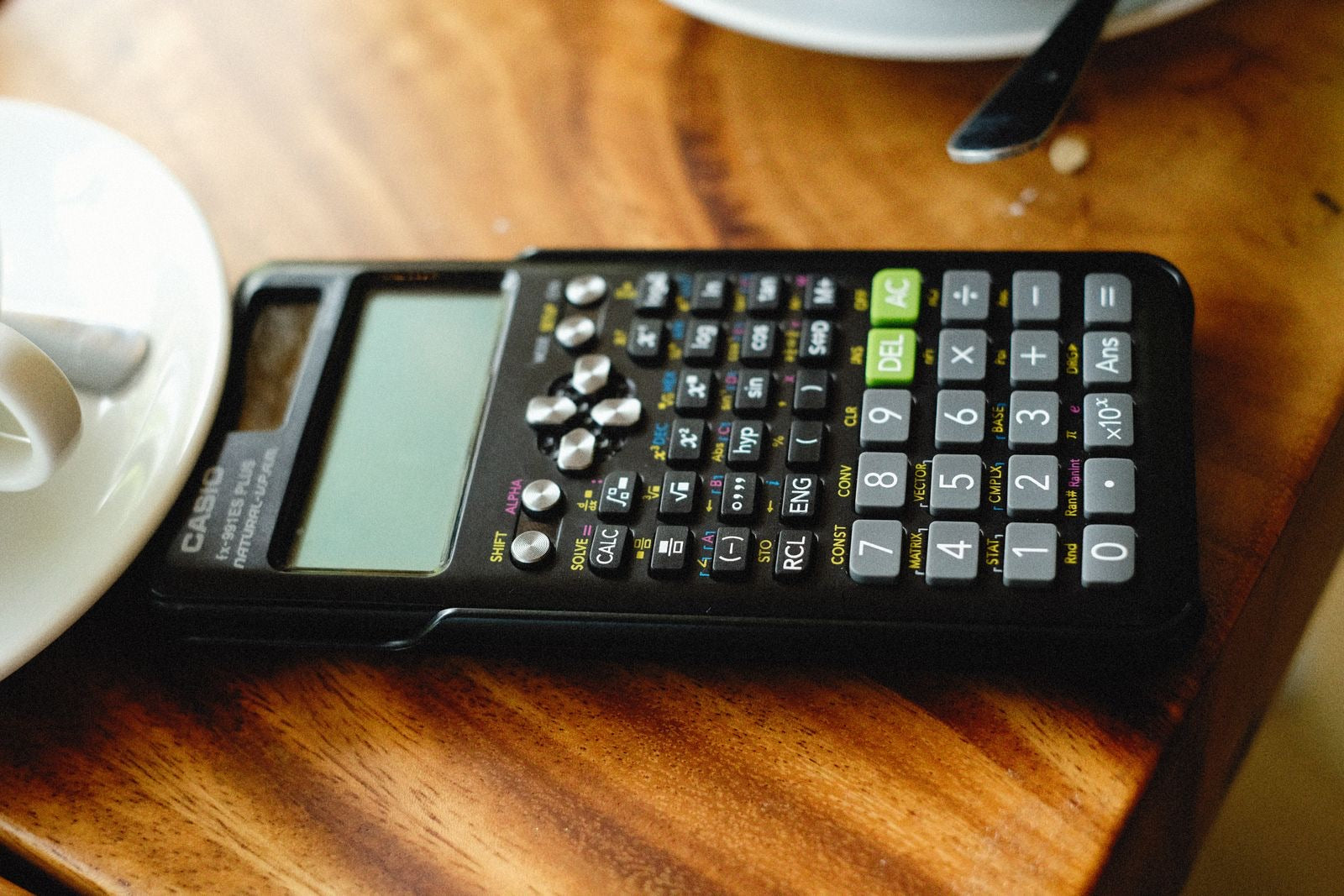

Engineering students spend four years bonding with a TI-84 or TI-89, and the FE exam's first small heartbreak is discovering that neither is allowed within fifty feet of the testing room. The approved list is short, deliberate, and strictly enforced at the door, which makes the calculator one of the few FE decisions you must get right weeks before exam day. The good news: the allowed models are inexpensive, more capable than they look, and the rules around them are simple once seen in one place. This guide covers exactly which calculators are allowed on the FE exam, why the list is so restrictive, which model to actually buy, and the exam-day rules that surprise unprepared candidates.
Which calculators are allowed on the FE exam?
NCEES allows exactly three calculator families on the FE exam: Casio fx-115 and fx-991 models, Hewlett Packard's HP 33s and HP 35s (no other HP models), and Texas Instruments TI-30X and TI-36X models. The policy is reviewed annually, so confirm the current list on ncees.org before you buy.
The rule is written by model-name pattern, which is worth understanding because it answers most "is my calculator okay?" questions instantly:
| Brand | Allowed | The rule |
|---|---|---|
| Casio | All fx-115 and fx-991 models | The model name must contain "fx-115" or "fx-991" (any suffix — ES Plus, EX, and so on — is fine) |
| Hewlett Packard | HP 33s and HP 35s only | No other HP models qualify, whatever their features |
| Texas Instruments | All TI-30X and TI-36X models | The model name must contain "TI-30X" or "TI-36X" — the TI-84 does not qualify |
Everything outside those families stays home: graphing calculators, programmable models, anything with wireless capability, phone apps, and smartwatches. The same policy applies across all NCEES exams, so the calculator you choose now serves you again on the PE. Since NCEES reviews the list annually, treat the table above as the current state and the ncees.org calculator page as the living authority.
Why the NCEES calculator policy is so restrictive
The list exists to protect exam integrity: approved models cannot store text, run programs, or communicate, which removes entire categories of cheating and keeps every candidate's toolkit identical. Once you see the criteria, the strange-looking list becomes predictable.
Think about what a TI-89 can do: store notes, run custom programs, solve symbolically. In an exam that measures whether you can apply engineering fundamentals, a device like that blurs what is being measured, and policing which features were used is impossible. So NCEES draws the line at scientific calculators with no programmability or storage worth exploiting, and enforces it by model family rather than by feature audit — simple to check at the door, impossible to argue with.
There is a second, less obvious purpose: standardization. Because everyone works with roughly equivalent computing power, the exam's time budget (about 2.9 minutes per question, as we break down in our FE exam timing guide) is calibrated to that power. The approved models handle everything the exam throws — matrices, complex numbers, numeric integration, equation solving — because the exam was written knowing exactly what they can do.
 200,000+ Learners and Counting


What is the best calculator for the FE exam?
For most candidates, the best FE exam calculator is the TI-36X Pro or a Casio fx-991 model: both offer multi-line displays, equation solvers, matrix and vector operations, and numeric integration, at modest prices. The right choice between them is mostly about which interface your hands already know.
Here is how the leading options compare:
| Model | Strengths | Best for |
|---|---|---|
| TI-36X Pro | Four-line display, strong equation solver, matrices/vectors, numeric integration; interface familiar to anyone raised on TI | The default pick for most US candidates |
| Casio fx-991 (e.g. EX ClassWiz) | Very fast, natural textbook-style display, spreadsheet mode, arguably the best solver in class | Candidates who grew up on Casio, or want the quickest workflow |
| HP 33s / HP 35s | RPN entry | Engineers who already think in RPN — a real advantage for them, a trap for everyone else |
Two honest notes on this choice. First, the differences are smaller than forum debates suggest: every approved model can execute every calculation the exam requires, so no pick locks you out of anything. Second, familiarity beats specifications — a candidate fluent on a basic TI-30X will outpace one fumbling with an unfamiliar fx-991 every time, which is why the section below on practice matters more than this one. Buy early, buy once, and make the choice permanent.
The onscreen TI-30XS: your built-in backup
The computer-based exam interface includes an onscreen TI-30XS calculator, available throughout the exam regardless of what you bring. It is the answer to the dead-battery nightmare, and a tool worth trying before you need it.
The onscreen calculator mirrors the physical TI-30XS MultiView: a capable scientific calculator operated by mouse and keyboard. As a primary tool it is slower than a physical calculator under your fingers, which is why nearly all candidates bring their own. But as insurance it changes the risk picture completely — a battery failure or a forgotten calculator inconveniences you rather than ending your attempt. Spend ten minutes with it during a practice session (it behaves like the physical TI-30XS, so any TI-30XS emulator approximates it) so that if the day comes, the backup is familiar rather than foreign.
Calculator rules on exam day
On exam day, your calculator comes into the testing room without its cover, passes the security check like everything else, and should be running on fresh batteries you installed that week. The rules are small, and the candidates they trip are the ones hearing them for the first time at the door.
The practical checklist: bring an approved model (the proctors check the model name against the list), leave the cover in your locker (covers are not permitted at the desk), and put fresh batteries in before exam week rather than gambling on year-old ones, remembering that the onscreen TI-30XS backstops a failure but at a speed cost. Everything else about the security process — the palm scan, the pocket check, the no-watches rule — applies to the calculator like any item, and the details sit alongside the fees and scheduling rules in our FE exam cost guide. None of it is onerous; all of it goes smoother when nothing about it is a surprise.
Practice with your exam calculator from day one
Whatever model you choose, use it for every single practice problem from the first week of preparation, because calculator fluency under time pressure is a rehearsed skill that quietly buys back minutes on exam day. The candidates who buy the right calculator and practice on their phone's app have optimized the wrong half.
The reasoning is the same as for the onscreen FE Reference Handbook: the exam rewards speed with your actual tools, not theoretical capability. Solving hundreds of practice problems on your exam calculator builds finger memory for the solver, the matrix menus, and the mode switches, and finger memory is what survives the pressure of a [5-hour-20-minute exam](/blogs/fe-exam/how-hard-is-fe-exam). Combine the calculator, the handbook PDF, and timed conditions in your final simulations, as laid out in our FE study schedule, and exam day operates like a rehearsal — worth doing right, given what the repeat-taker pass rates say about second attempts. That realistic, tools-and-all practice experience is exactly what our FE Civil Practice Exams and FE Mechanical Practice Exams are built to provide.
200,000+ Learners and Counting
Frequently Asked Questions
What calculators are allowed on the FE exam?
Three families, per NCEES's current policy: Casio models containing "fx-115" or "fx-991" in the name, the HP 33s and HP 35s, and Texas Instruments models containing "TI-30X" or "TI-36X". The list is reviewed annually, so confirm on ncees.org before buying.
Is the TI-84 allowed on the FE exam?
No. The TI-84, TI-89, and all other graphing or programmable calculators are prohibited. Only TI models with "TI-30X" or "TI-36X" in the model name are permitted from Texas Instruments.
What is the best calculator for the FE exam?
The TI-36X Pro and the Casio fx-991 models are the strongest picks for most candidates: multi-line displays, equation solvers, matrices, and numeric integration. Choose whichever interface you already know, and then practice exclusively on it.
Is a calculator provided at the FE exam?
Yes, in one form: the exam interface includes an onscreen TI-30XS available throughout the test. It works well as a backup but is slower than a physical calculator, so nearly all candidates bring an approved model of their own.
Can you bring a graphing calculator to the FE exam?
No. Graphing, programmable, and communication-capable devices are all banned, and proctors verify your calculator's model name at check-in. Bringing an unapproved model means taking the exam with only the onscreen calculator.
What happens if your calculator fails during the FE exam?
You continue with the onscreen TI-30XS built into the exam interface, so a battery failure costs speed rather than the attempt. Fresh batteries installed during exam week make the scenario unlikely in the first place.


Free FE Mechanical Practice Problems with Solutions [2026]
Work 30 free FE Mechanical practice problems with full step-by-step solutions — real questions from our practice exams covering all 14 NCEES knowledge areas.


Free FE Civil Practice Problems with Solutions [2026]
Work 30 free FE Civil practice problems with full step-by-step solutions — real questions from our practice exams covering all 14 NCEES knowledge areas.

FE Electrical and Computer Exam: Complete Guide [2026]
The FE Electrical exam explained: all 17 knowledge areas with question counts, the real pass rate, format and timing, cost, and how to prepare for it.
